API tokens (administration)
An API token lets a script or an AI assistant use Tesria as the person who made it, without a browser. People make and revoke their own on their profile (see API tokens). This tab is where an administrator sees all of them at once: whose each one is, how much it is used and from where, what assistants did with theirs, and, when something looks wrong, revokes one.
To open it, choose Admin, API tokens (Admin is in the top bar; in a narrower window it is under More, and on a phone in the ☰ menu). You need the right to see the user list; revoking also needs the right to manage users. Both come with the Administrator role.
The tokens themselves are never shown, only the first few characters their owner also sees. Nobody, administrators included, can read a token back and use it.
At a glance
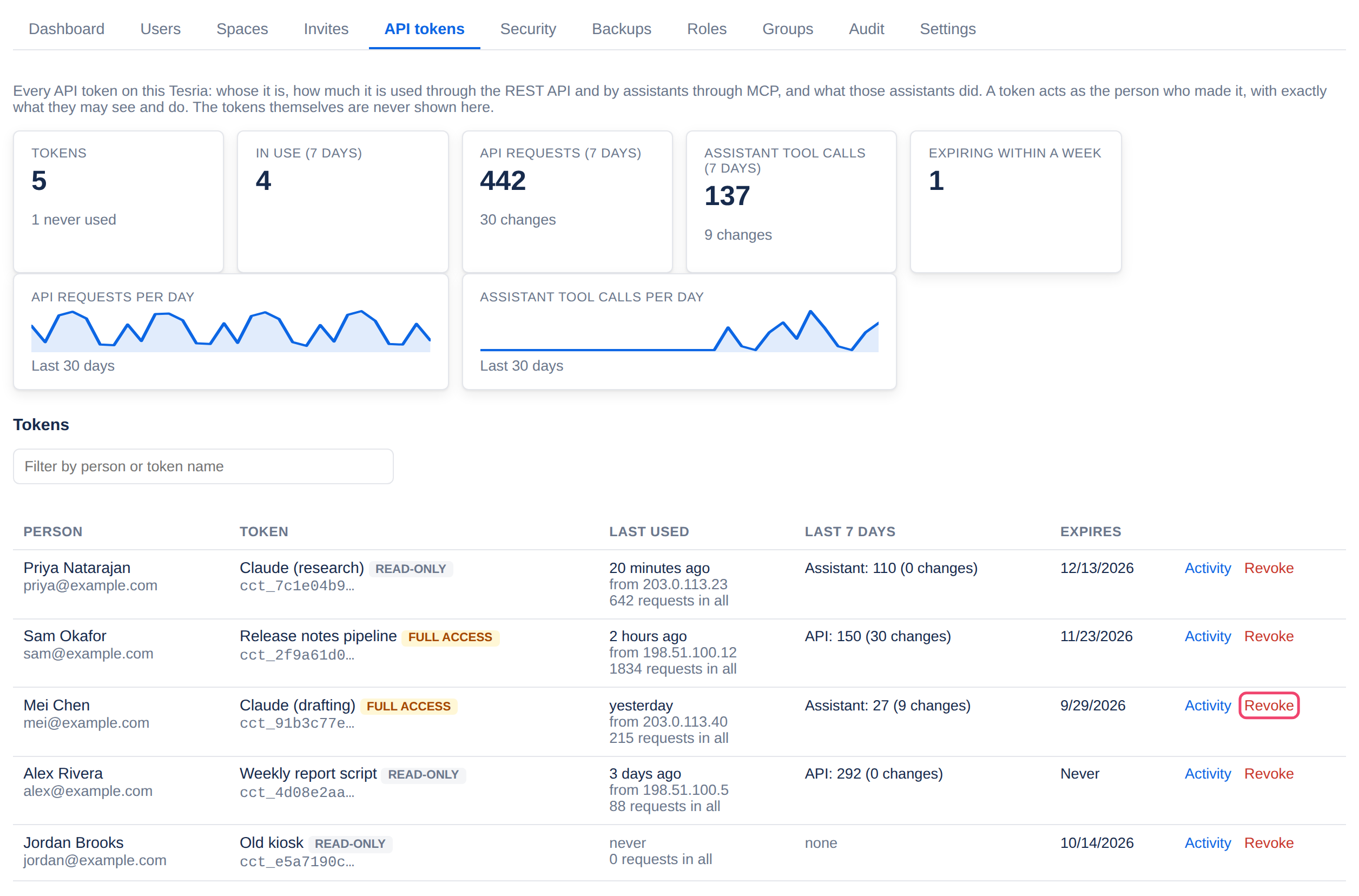
The cards at the top count the last 7 days: how many tokens there are (and how many were never used), how many were used, how many requests came through the REST API, how many tools assistants called through MCP, and how many tokens expire within a week. The two charts below them show requests and tool calls per day for the last 30 days, so a sudden jump stands out. Both include tokens revoked since, so removing a token does not erase what it did.
The list of tokens
Each row is one token, the most recently used first. Type in Filter by person or token to find one by the person’s name or email, or the token’s name.
Person: whose token it is, with their email, and suspended if their account is. A suspended account’s tokens do not work.
Token: the name its owner gave it, its first characters, and whether it is read-only or has full access.
Last used: when, from which address, and how many requests it has made in all (counted from Tesria 0.6).
Last 7 days: requests through the API and tool calls by an assistant, each with how many changed something. A change that was refused, for example by a read-only token, is counted as a request but not as a change.
Expires: the date it stops working, Never, or expired.
What assistants did
Below the list, every tool an assistant called through MCP, newest first: when, whose token, what it did (read a page, searched, changed a page, added a label, and so on), which page, and whether it worked. Choose Activity on a token’s row to see only that token’s; Show every token goes back.
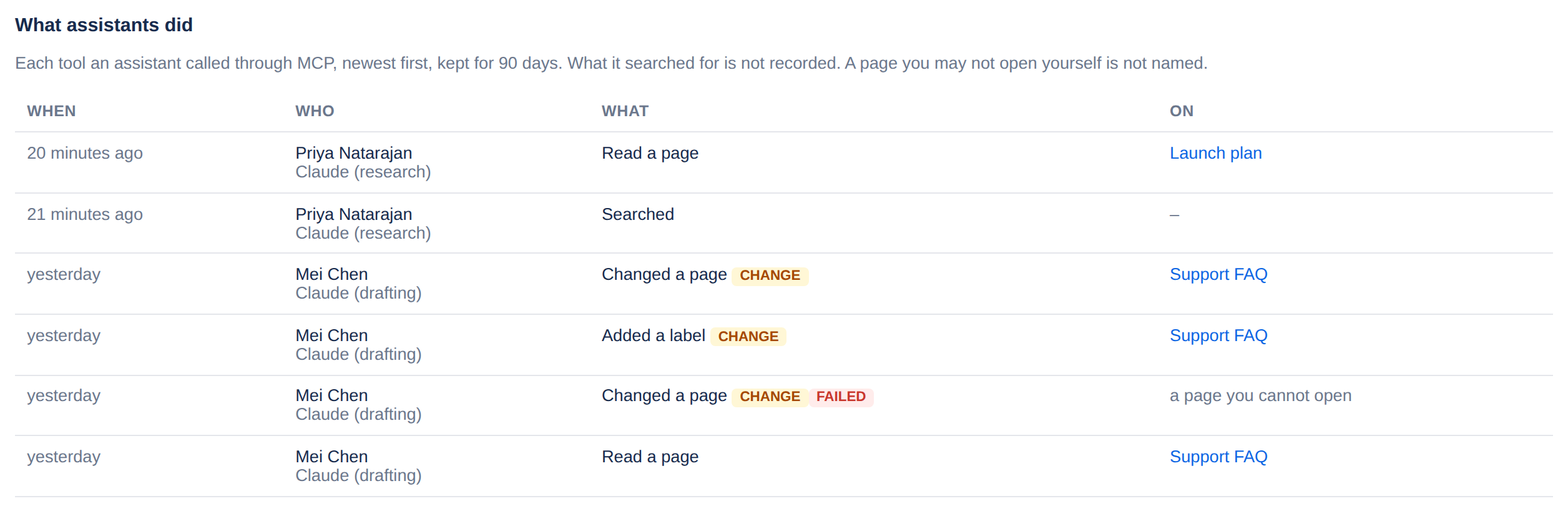
Kept for 90 days, and kept after a token is revoked, so you can still see what it did.
What an assistant searched for is not recorded, only that it searched.
A page you may not open yourself is not named. It shows as a page you cannot open. Being able to see tokens is not a way into a private space.
The API’s own requests are counted, not listed one by one. To see what a script changed, look at the page’s history, or at Audit.
Revoking a token
Step 1: Find the token
Use the filter, or look down the list.
Step 2: Choose Revoke
Revoke is at the end of the row, beside Activity.
Step 3: Confirm
Tesria asks first, naming whose token it is. Choose Revoke the token. Whatever used it stops working at once. The person’s other tokens keep working, and they are told in the bell (and by email, if they get notifications by email) which token was revoked. The audit log records it.
The owner’s tokens are the owner’s. Only the owner can revoke them. Another administrator’s need the right to manage administrators’ accounts, which the owner can give (see Roles).
To stop all of one person’s tokens at once, use Revoke tokens beside them in Users, or suspend the account.
What to look for
A token used from an address you do not recognize. Ask its owner. If they do not know either, revoke it.
Full access used only for reading. If a token never changes anything, suggest its owner replaces it with a read-only one.
Tokens never used, or not for months. Ask whether they are still needed.
An assistant making many changes, or many failed calls. The first is worth a look at the pages it changed; the second usually means a misconfigured assistant.
Tokens of people who have left. Suspending their account stops every token they made.
Applies to | Tesria 0.6 and later |
|---|---|
Updated | September 24, 2026 |
Changes | New in 0.6. |