Webhooks
A webhook is Tesria calling another program the moment something happens in a space. Instead of your program asking Tesria every few minutes “has anything changed?”, Tesria tells it, straight away, by sending it a short message over the web.
Some things people do with one:
Post “Launch plan was updated by Sam” to a team chat, through a small program that receives the webhook and passes it on.
Rebuild a public help site whenever a page in its space is published.
Keep a record elsewhere of every comment in a space.
You need something at the other end that can receive a web request: a small program you run, or an automation service that gives you a web address to call. Webhooks belong to a space, and only people who can administer that space can see or set them up.
Setting one up
Step 1: Open the space’s Webhooks tab
In the space, choose Space settings, then the Webhooks tab.
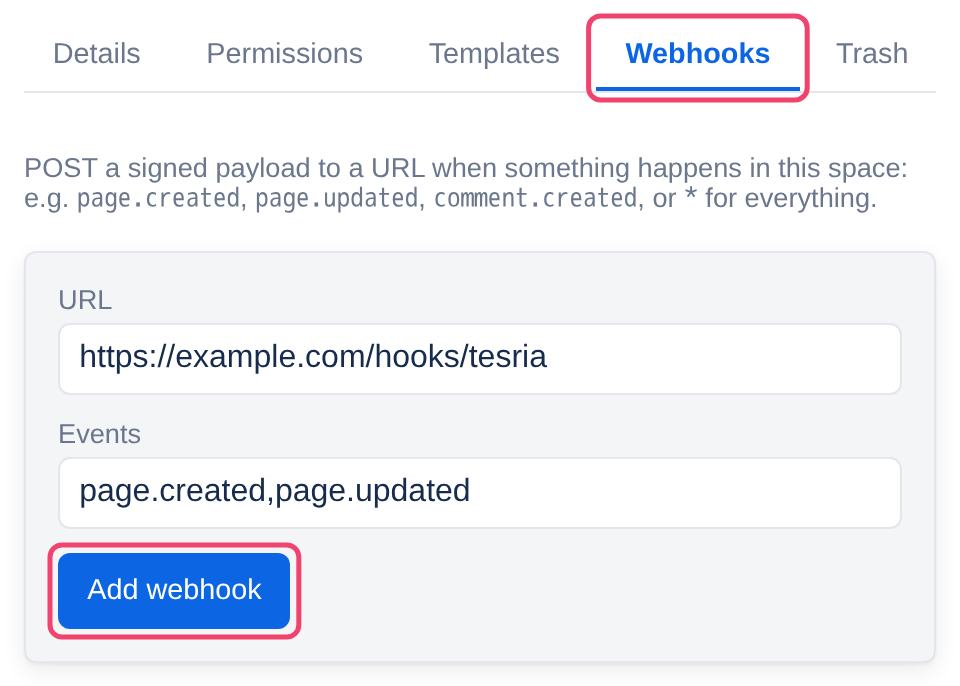
Step 2: Enter the address and the events
URL: the web address of the program that will receive the messages, starting with
https://(orhttp://).Events: which happenings to send, separated by commas, such as
page.created,page.updated. Leave*, the default, for all of them. The events are listed below.
Step 3: Choose Add webhook, and copy the secret
Tesria shows the webhook’s signing secret once. Copy it into the receiving program’s settings, then choose Done. The program uses it to check that each message really came from your Tesria (see below). If you lose it, delete the webhook and add it again.
To change a webhook, delete it (Delete beside it in the list) and add a new one. The receiving program is not told either way.
The events
page.created: a page is published for the first time, from the editor, the API or an assistant.page.updated: a page is updated, or restored to an earlier version.comment.created: someone comments on a page.*: all of the above.
Drafts send nothing: a page is only news once it is published. Neither does moving, reordering or deleting a page.
What arrives
Each message is a POST request with a JSON body like this:
{
  "event": "page.updated",
  "targetType": "page",
  "targetId": "6f1c2a90-…",
  "metadata": { "Title": "Launch plan" },
  "timestamp": "2026-09-23T14:30:00Z"
}targetIdis the page’s id, for comments too. Ask the API for the page (/api/pages/<id>) if you need more than the title.For a comment,
metadataholdsBody, the comment’s first 140 characters, instead ofTitle.The names inside
metadatastart with a capital letter, unlike the rest.
Checking a message came from Tesria
Anyone who knows your program’s address could send it a fake message. So every real one carries a header, X-Webhook-Signature: sha256=…, which is a fingerprint of the message made with the signing secret. Only something that knows the secret can make it. Your program works out the same fingerprint and compares; if they differ, it ignores the message.
Compute it over the body exactly as it arrived, before any JSON parsing, using the secret as text. In JavaScript (Node):
import { createHmac, timingSafeEqual } from 'node:crypto'

function fromTesria(rawBody, header, secret) {
  const expected = 'sha256=' + createHmac('sha256', secret).update(rawBody).digest('hex')
  return header.length === expected.length && timingSafeEqual(Buffer.from(header), Buffer.from(expected))
}
In Python:
import hashlib, hmac

def from_tesria(raw_body: bytes, header: str, secret: str) -> bool:
    expected = 'sha256=' + hmac.new(secret.encode(), raw_body, hashlib.sha256).hexdigest()
    return hmac.compare_digest(header, expected)
How delivery works
Sent after the change is saved, one message at a time.
Tried up to three times. If the receiver answers with an error, or not within 5 seconds, Tesria waits 2 seconds and tries again, then 4 seconds and tries once more, then gives up on that message.
Not kept across a restart. Messages waiting to be sent are held in memory, so restarting Tesria loses them. If your program must not miss anything, have it also check the API now and then.
Your own network is off limits. A webhook cannot call an address inside a private network, including this server and other machines on your home or office network, nor a name ending in
.local. Tesria refuses it when you add it, and checks again each time it sends. This stops a webhook from being used to reach machines the internet cannot.
Nothing arriving? Tesria records every attempt in its log. On the server, docker compose logs app | grep Webhook shows each delivery, failure and refusal, with the reason.
Applies to | Tesria 0.5 and later |
|---|---|
Updated | September 24, 2026 |
Changes | Written for Tesria 0.5. |