Retention
Backups take disk space, and a disk that fills up stops the backups. The retention policy decides how long backups are kept, so old ones are removed before that happens. It applies to both kinds of backup, and to nothing else: pages, history and the trash are never touched by it.
The two choices
Keep every backup forever. Nothing is ever removed. Keep an eye on the disk space on the Backups tab.
Prune old backups: keep the newest N backups and everything from the last D days.
With pruning, a backup is removed only when it is outside both: older than D days, and not among the newest N. For example, with 7 backups and 14 days, a backup from a month ago is removed, unless it is one of the last 7. So even if backups stopped for a while, the last 7 are always there, however old.
Changing it
Step 1: Open the retention policy
Choose Admin, then Backups, and scroll to Retention policy.
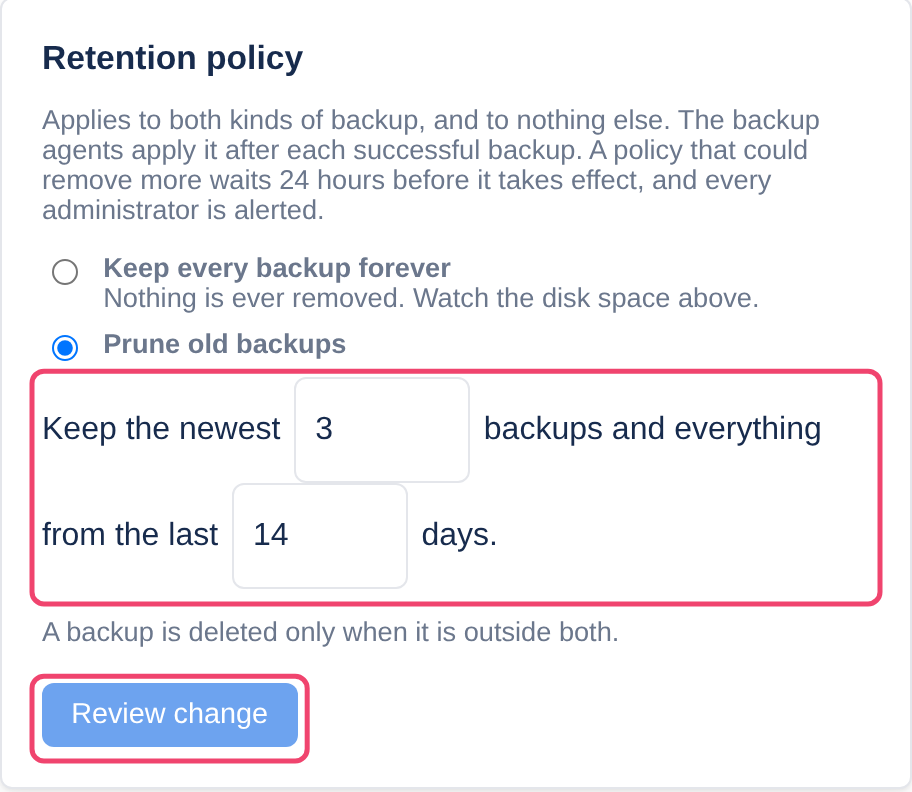
Step 2: Choose the policy
Pick one of the two choices, and with Prune old backups, the number of backups and of days.
Step 3: Review the change
Choose Review change. Before anything happens, Tesria lists exactly which backups the new policy would remove today, and how far back you could still restore. If it looks right, choose Save policy. Unless you signed in in the last few minutes, Tesria asks for your password first.
Why some changes wait a day
A change that keeps more takes effect at once.
A change that could remove more waits 24 hours, and every administrator is alerted when it is saved. That is time for someone to notice if it was a mistake, or was not made by you. The service cards say when it will take effect, and nothing is removed before then.
Administrators can change the policy unless the owner takes that right away from a role on the Roles tab.
Offsite copies
The cloud’s database copy keeps its own count of full backups (
OFFSITE_CLOUD_RETENTION_FULL, 4 unless set), because an offsite copy is usually kept longer.The dumps and attachments copied offsite follow this policy, so they expire together with the ones on this computer.
A removable drive keeps a count with no time limit, so a drive left in a drawer for months is not emptied when it comes back.
Applies to | Tesria 0.5 and later |
|---|---|
Updated | September 24, 2026 |
Changes | Revised. |