Search
Search looks through the title and text of every page you can read, in every space, and lists the best matches first. It is the quickest way to a page when you remember something it says but not where it lives.
Searching
Type into Search pages… in the top bar and press Enter. On a phone the search box is in the ☰ menu.
Each result shows the page’s title, the key of the space it is in, and the passage that matched, with your words highlighted. Choose a title to open the page.
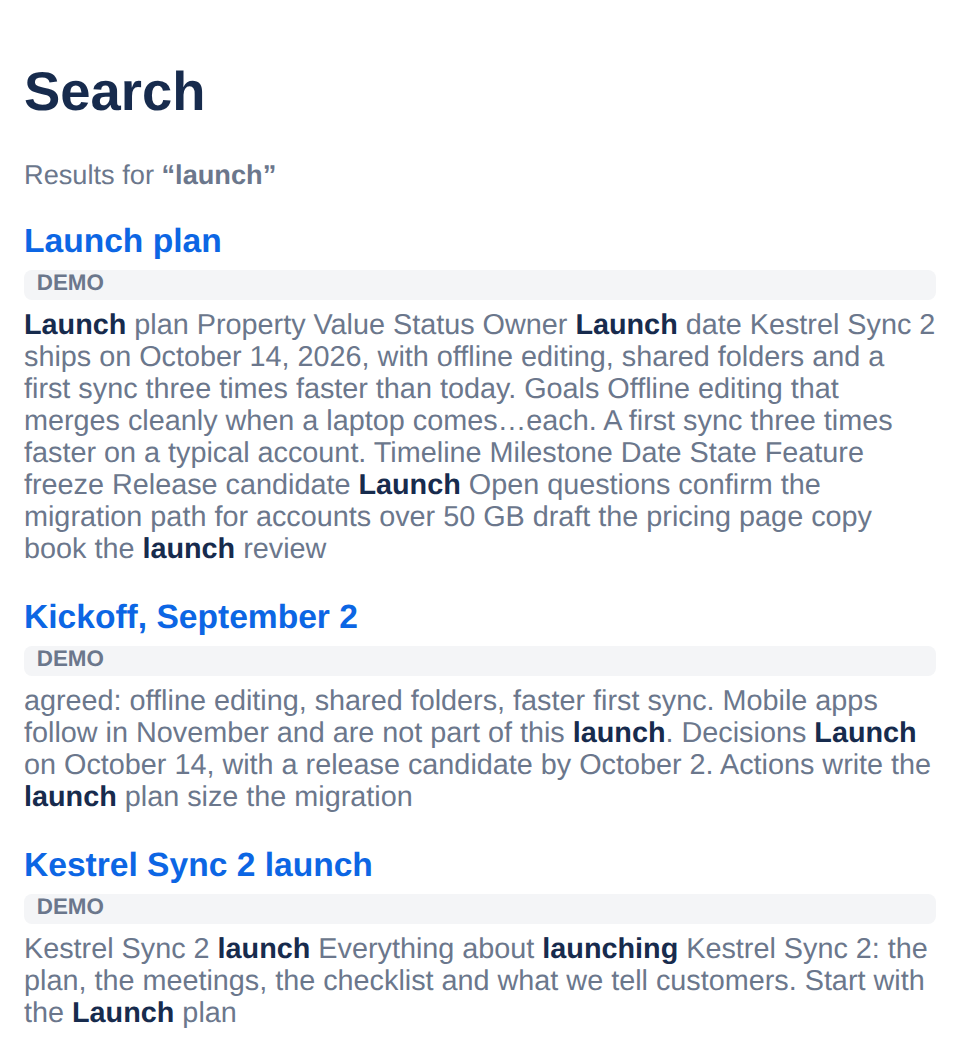
What is found
Different endings of a word match. Searching
launchingfinds pages that saylaunch,launchedorlaunches.Only published pages you can read, from every space you can see. Drafts, pages in the trash and pages restricted from you are never found.
Up to 50 results. If what you want is not among them, add a word to narrow the search.
Some things are not searched: comments, labels, the names of attached files, and the text inside mentions, statuses and dates. To find pages by label, use the label instead: see Label pages.
Narrowing a search
Type | Finds |
|---|---|
"release checklist" | The exact phrase |
launch or release | Either word |
launch -beta | launch, but not pages with beta |
Capitals make no difference, and small words such as the and of are ignored.
Reading without an account? In a Tesria with public spaces, people who are not signed in can search too, and find pages in the public spaces only.
Applies to | Tesria 0.5 and later |
|---|---|
Updated | September 24, 2026 |
Changes | Revised. |