Backups and recovery
A backup is a copy of the wiki from which it can be rebuilt: if a disk fails, a change goes badly wrong, or the computer is lost, the backup is how you get your pages back. Tesria starts backing itself up the moment it is installed, with nothing to set up. Every day it copies the database and every attachment, and it keeps a running record of every change in between, so you can go back to last night, or to the minute before something went wrong.
Where to see them
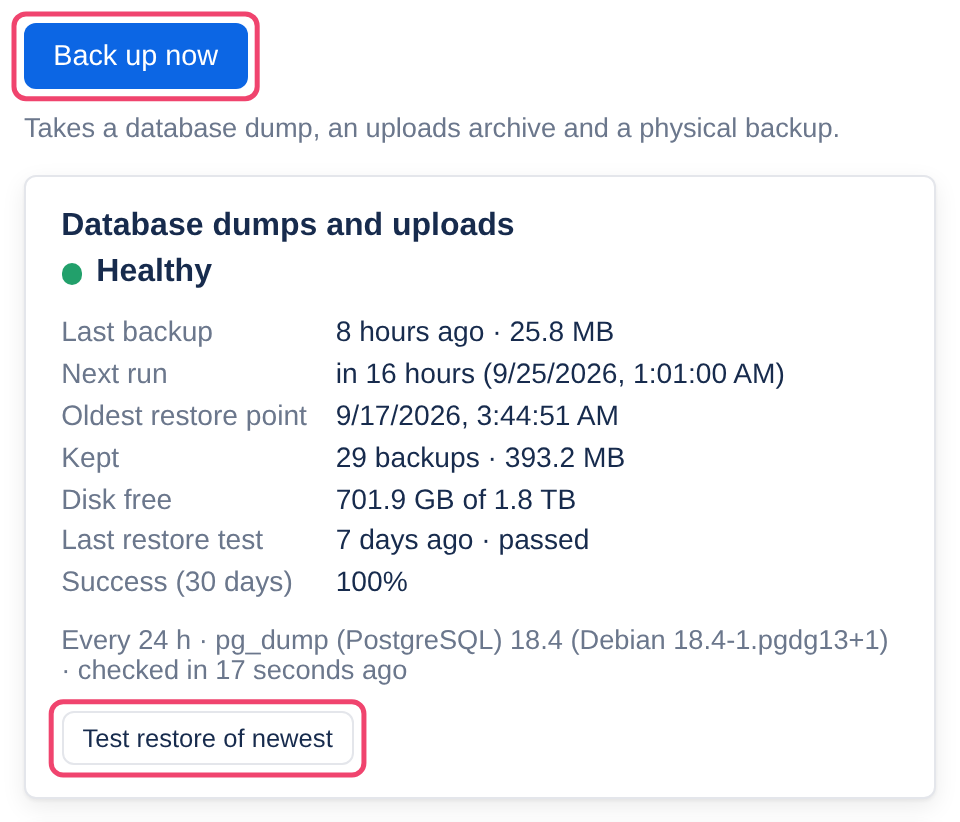
Choose Admin at the top of any page, then the Backups tab. Each backup service has a card saying whether it is healthy and when it last worked. Above them, Back up now takes a backup straight away, and each card’s Test restore of newest proves its newest backup can be restored, without touching the wiki.
The one thing to do yourself
Every backup Tesria takes on its own is on the same computer as the wiki, so a dead disk, a fire or a theft takes both. Two things protect against that, and only you can do them:
Set up an offsite copy, in the cloud, on a network drive, or on a removable drive. See Offsite copies.
Keep the passphrases from .env somewhere else, such as a password manager. A copy whose passphrase is lost cannot be read by anyone.
You may not need a backup at all
For everyday mistakes, Tesria has safety nets of its own that put things right in seconds, without touching anyone else’s work: every page keeps its history, and deleted pages go to the space’s trash. A backup is for when the whole wiki needs to go back.
In this section
Applies to | Tesria 0.5 and later |
|---|---|
Updated | September 24, 2026 |
Changes | Revised. |