Watching
Watching is how you choose what you hear about. Watch a page and you are told when it is updated or commented on; watch a whole space and you hear about every page in it, including new ones. It saves you from checking pages to see whether anything has changed.
Nothing is watched until you ask, not even pages you create yourself.
Watching a page
Open the page, then its ⋮ menu at the top right, and choose Watch this page.
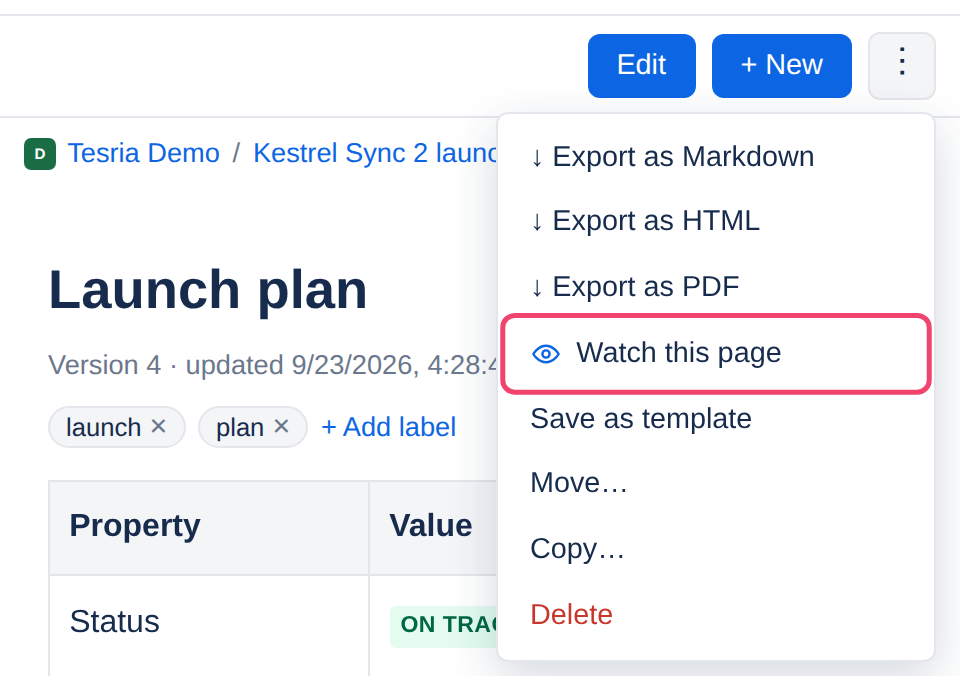
From then on the menu shows Watching instead. Choose it to stop.
Watching a space
Open the space’s home page (choose the space’s name, or pick it on the Spaces page) and choose Watch this space at the top right. You then hear about every page in the space: new pages, updates and comments. The button changes to Watching; choose it again to stop. See The space home and watching.
Which to choose
Watch a space when it is small, or when it is yours to look after: a team space you want to keep tidy, or a project you run.
Watch a page in a busy space where only a few pages matter to you, such as the release checklist or the on-call rota.
Watching does not give access. You can only watch what you can see, and if a page is later restricted so that you cannot open it, you stop hearing about it.
Applies to | Tesria 0.5 and later |
|---|---|
Updated | September 24, 2026 |
Changes | Revised. |